
AI Room Designer for a Bedroom: Redesign Your Bedroom From a Photo
An AI room designer turns a single phone photo of your bedroom into a set of realistic redesigns — calming palettes, smarter bed placement, and fully styled looks — in seconds instead of weeks.

The bedroom is the one room where mood matters most, so this guide shows how to use AI to pick sleep-friendly colors, plan the layout around your bed, try styles like Japandi or Scandinavian, and compare before/after variations from your own space.
How an AI Room Designer Redesigns a Bedroom From a Photo
Under the hood, an AI bedroom designer runs a fairly simple pipeline: it analyzes your photo, classifies each pixel as structural or removable, then repaints only what’s allowed to change.
Upload, and the AI reads your room
Walls, windows, and the ceiling are treated as structural and stay put. The bed, nightstands, rug, and decor are flagged as removable and get restyled by a diffusion model fine-tuned on millions of interior photos. Most tools support two input modes — image-to-design, where you upload a photo of your actual room, and text-to-design, where you just describe the space you want. RoomGPT, one of the better-known free tools in this category, reports more than 4 million users.
You get variations, not one guess
A single run typically produces one to four variations that you can compare side by side, rather than committing to a single AI bedroom design generator’s first guess. Results land in seconds instead of the weeks a traditional redesign takes, and visualization costs drop roughly 95–99% compared with hiring a professional, whose fees can run $2,000–$12,000 per room once furnishings are included. Apartment Therapy tested more than a dozen free AI interior design tools hands-on, and its top picks all centered on the same workflow: upload a photo of your real room and get restyled variations back, rather than generating a room from a text prompt alone.
Pick a Calming Bedroom Color Palette With AI
Color does more work in a bedroom than in any other room, because it’s tied directly to how quickly you unwind and how well you sleep.
The colors that actually help you sleep
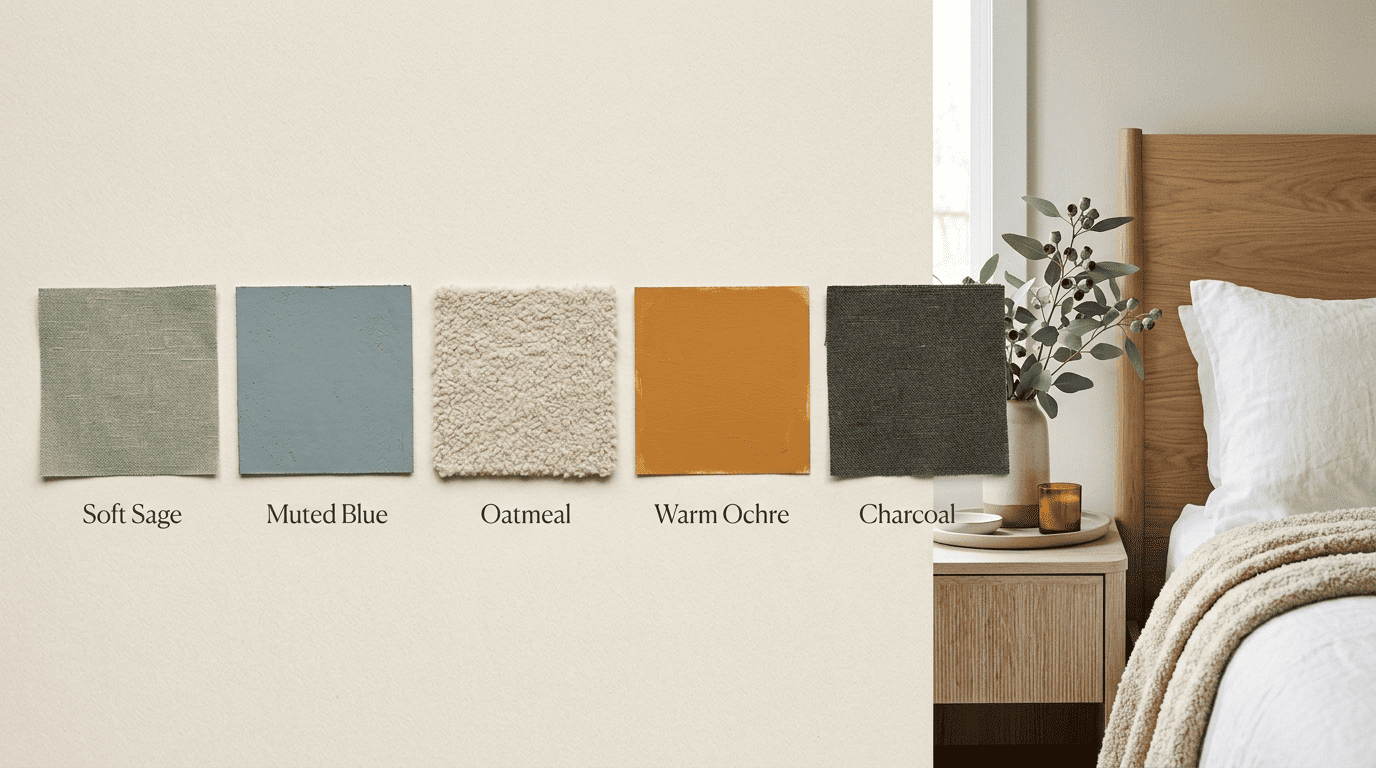
According to the Sleep Foundation, blue, green, and white are among the most restful bedroom colors, while red and other bright, saturated hues tend to be more stimulating. Blue is singled out as the most calming color for a bedroom, linked to lower heart rate and blood pressure — and one survey cited by the Sleep Foundation found that people with blue bedrooms had the longest average sleep per night compared with other bedroom colors. When you’re testing an AI bedroom design generator, ask it to keep saturation low and lean on sage, muted blue, oatmeal, and a single warm accent rather than anything bright or saturated.
| Palette direction | Best for | Avoid |
|---|---|---|
| Soft sage + oatmeal | Calm, natural feel | High-gloss finishes |
| Muted blue + charcoal | Most calming, per Sleep Foundation | Cool blue paired with cold lighting |
| Pale lavender + warm white | Small bedrooms, softness | Saturated purple |
| Warm neutral + wood tones | Primary bedrooms, grounding | Bright red or orange accents |
Let the AI test palettes on your walls
Instead of guessing from paint chips under store lighting, have the AI apply each palette to your actual bedroom photo so you can see how sage or muted blue reads against your specific light and floors. For a deeper dive on building and balancing a full scheme room by room, you can build a full AI color palette using the same photo you start with here.
Plan Bed Placement and Bedroom Layout With AI
Color sets the mood, but layout is what makes a bedroom function — and it starts with a single decision: where the bed goes.
Anchor the bed first. The bed drives the whole layout. Put the headboard against a solid wall where you can see the door without being directly in line with it — often called the commanding position — and avoid pointing the foot of the bed straight at a doorway. AI layout suggestions let you test different wall options against your actual photo before you move anything heavy.
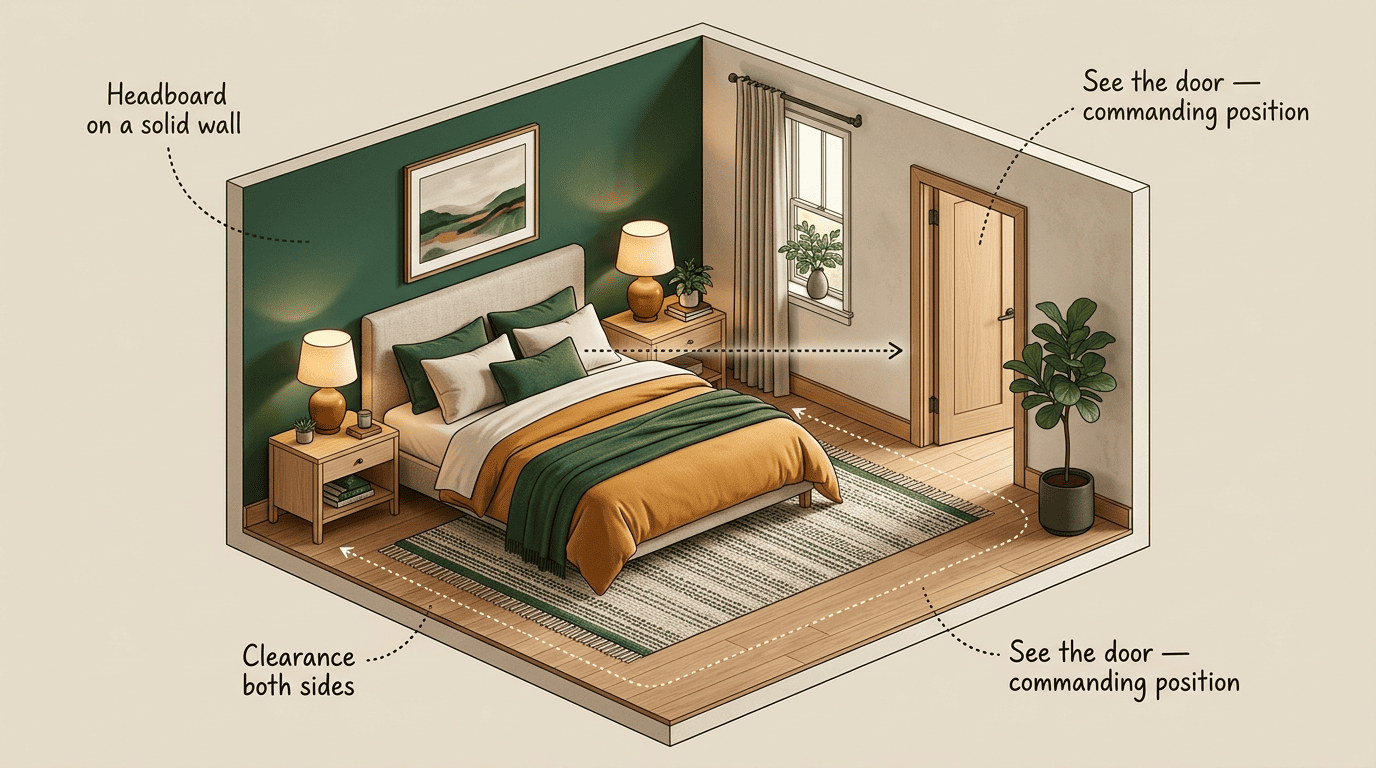
Give the bed breathing room. Aim for roughly 18–24 inches of clearance on each side for a twin or full bed — closer to 24–30 inches for a queen and 30–36 inches for a king — so both sides of the bed stay accessible, and balance the composition with matching nightstands and lamps. Ask the AI to keep circulation paths clear and the layout visually symmetrical.
Don’t fight the room’s shape. If a solid wall isn’t available opposite the door, the AI can test a diagonal placement or an alternate wall — this is exactly the kind of trial-and-error that’s expensive to do with real furniture but free to do with a rendered photo.
A quick way to test bed placement on your own room:
- Take a well-lit, straight-on photo of your bedroom from the doorway.
- Upload it to an AI room designer and ask for 2–3 bed placement variations.
- Check each variation for a clear sightline to the door without a direct line-up.
- Confirm at least 18–24 inches of clearance on both sides in the render — more if you have a queen or king bed.
- Cross-reference against your real room’s outlets and window placement.
- Pick the layout that keeps the most floor space open.
- Measure your actual furniture against the render before buying anything.
Choose a Bedroom Style: Japandi, Scandinavian, Minimalist, Boho
Most AI tools offer a dozen or more style presets, but for a bedroom, a handful of calm-leaning styles consistently outperform louder, more maximalist looks.
Calm-leaning styles that suit bedrooms
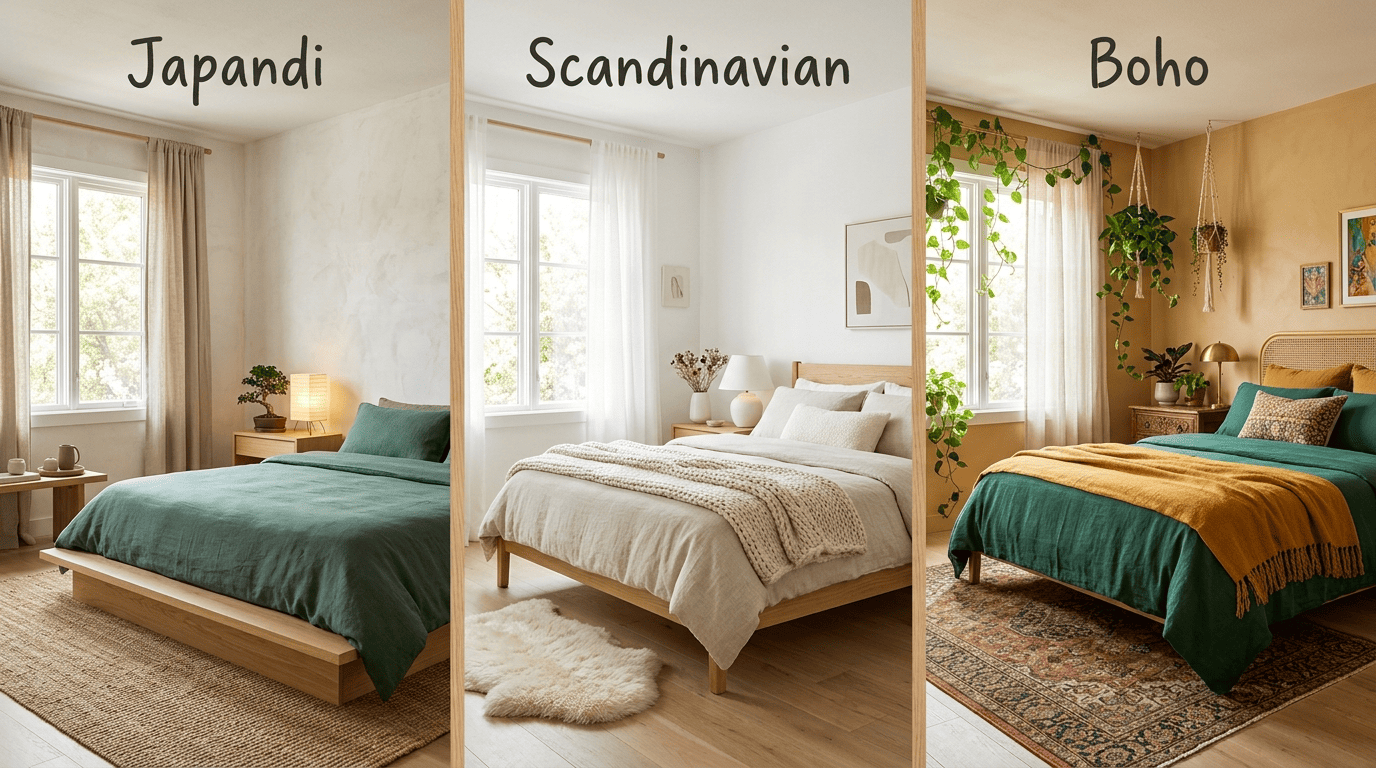
Japandi blends Japanese minimalism with Scandinavian warmth — low furniture, natural wood, and muted earthy tones — and reads especially serene for sleep, often paired with warm 2700–3000K lighting and linen or paper diffusers. Scandinavian style keeps things bright with white walls, light oak, and cozy hygge textiles. Minimalist strips a bedroom back to a few clean pieces and generous negative space. Boho layers rattan, plants, and warm eclectic textiles for a softer, more collected look.
Try several on the same room
Because AI generates variations from one photo, you can preview Japandi, Scandinavian, minimalist, and boho on your exact bedroom and compare them directly, rather than imagining each from a moodboard. Once you see them side by side, it’s common to borrow individual elements — a wood headboard from the Japandi render, a linen throw from the boho one — instead of committing to an entire style wholesale.
Small Bedroom vs Primary Bedroom
The right AI bedroom design generator prompt changes a lot depending on square footage, so it’s worth treating small and primary bedrooms as two different problems.
Small bedrooms: make it feel bigger
In a small bedroom, ask the AI for light, airy palettes — soft beige, pale grey, pastels — along with dual-purpose furniture like storage beds and ottomans, and vertical wall-mounted shelves that keep the floor clear. When the room is genuinely tight, prioritize the commanding bed position over perfect clearance; a slightly narrower gap on one side beats a bed that can’t see the door.
Primary bedrooms: layer and zone
A primary or master bedroom has room to zone: a reading nook, a statement headboard, and richer textile layering all become realistic options. The same photo-to-design workflow scales up for larger rooms, and if you’re tackling shared spaces next, it’s worth seeing how the process compares when you redesign a living room with the same tool.
| Bedroom type | Priority | AI prompt focus |
|---|---|---|
| Small bedroom | Feel bigger, stay functional | Light palette, storage beds, vertical shelving |
| Primary bedroom | Zoning, comfort | Reading nook, statement headboard, layered textiles |
Lighting and Textiles: The Finishing Layers
A well-placed bed in the right colors still won’t feel finished without lighting and textiles doing their part.
Light in layers, warm at night
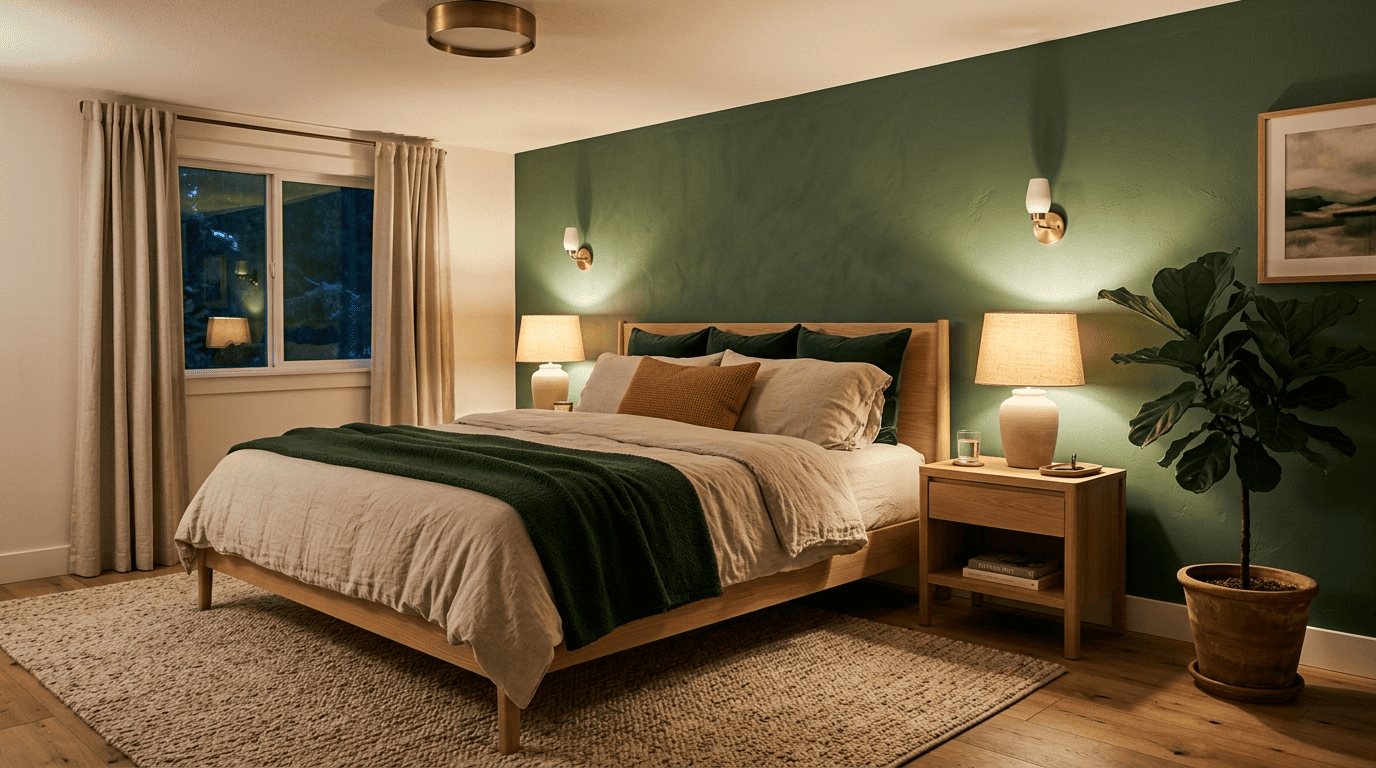
Plan four lighting layers: ambient ceiling light on a dimmer, bedside task lamps for reading, accent sconces, and a very warm night or mood glow. Keep evening light around 2700K, shifting warmer still — into the 1800–2200K candlelight range — in the hour or so right before sleep, because blue-rich light in the couple of hours before bed can suppress melatonin, the hormone that signals your body it’s time to rest. AI renders help you see where each fixture belongs before you buy or install anything, but the color temperature of the bulbs is a spec you set yourself once the layout is settled.
Textiles make it feel like a bedroom
Layered linen bedding, a wool or boucle throw, and a soft rug add warmth and quiet a room acoustically as well as visually. Ask the AI to suggest textile combinations that match your chosen palette and style so the render, and the eventual real room, feel cohesive rather than assembled piece by piece.
AI renders are design ideas, not construction plans — confirm measurements, materials, and any structural or renovation work with a professional or contractor before you buy furniture or move a wall.